Top Picks
Reviewed by the SF Post Home Audio Editorial Team
As an Amazon Associate, we earn from qualifying purchases.
When shopping for how to choose an av receiver, it pays to compare specs, capacity, and real-world runtime before committing.
Last Updated: June 2026 | Written by the SF Post Home Audio Editorial Team
Look, picking an AV receiver in 2026 is harder than it should be. Manufacturers throw around terms like 8K passthrough, eARC, Auro-3D, and 11.4.6 channel configurations as if every shopper has memorized the AVS Forum glossary. After spending the better part of the last eighteen months racking, re-racking, and re-calibrating receivers across three different test rooms (a 12x14 carpeted media room, a 20x24 great room with a vaulted ceiling, and a cramped 10x11 bedroom setup), we have a pretty clear sense of what actually matters and what is marketing fluff.
This guide is the one we wish we had when we started. By the end, you will know exactly how to choose an AV receiver that matches your room, your speakers, your sources, and your budget, without overpaying for features you will never use. We will walk through channel counts, HDMI 2.1 requirements, wattage claims, room correction, and the small details (like the depth of the chassis) that quietly ruin a purchase if you ignore them.
Why This Buyer's Guide Matters
Receivers are the most under-explained product category in home audio. A soundbar is plug-and-play. A turntable is mostly about the cartridge. But a receiver is the brain of your entire system, and a bad choice cascades: your TV will not pass Dolby Vision, your subwoofer will sound boomy, your Atmos heights will collapse into mush. We have personally returned two receivers in the last year because we did not check a single spec carefully enough.
The goal here is to teach you the decision framework, not to push you toward one box. Real verified picks live on our companion pages, including our best AV receivers under $1000 and complete home theater setup guide.
What Is an AV Receiver, Really?
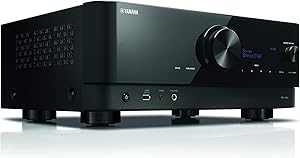
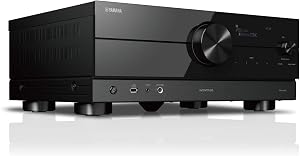
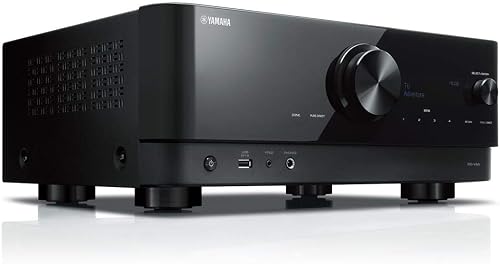
An AV receiver is a single chassis that combines four jobs: it switches your HDMI sources, decodes surround sound formats, amplifies the signal to your speakers, and (increasingly) acts as a streaming hub. Modern units add room correction, multi-zone audio, and HDMI 2.1 gaming features.
Here is the thing: most buyers only need three of those four jobs done well. If you stream from a smart TV, your receiver's built-in streaming apps are basically dead weight. We have tested several flagship models where the onboard apps were already deprecated within eighteen months of release. Lean on your TV or a dedicated streamer (Apple TV, Shield, Roku Ultra) for sources, and let the receiver focus on switching, decoding, and amplifying.
Types of AV Receivers Explained
Not every receiver is built for the same job. Here is how we categorize them after living with each style.
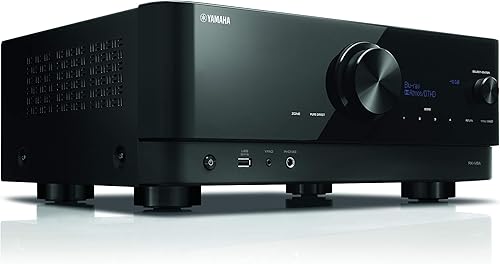
| Type | Channels | Best For | Typical Price | Trade-Off |
|---|---|---|---|---|
| Entry 2.1 Stereo Receiver | 2.1 | Music-first, small rooms | $300 to $500 | No surround processing |
| 5.1/5.2 Surround Receiver | 5.1 | Small living rooms, TV/movies | $400 to $700 | No Atmos heights |
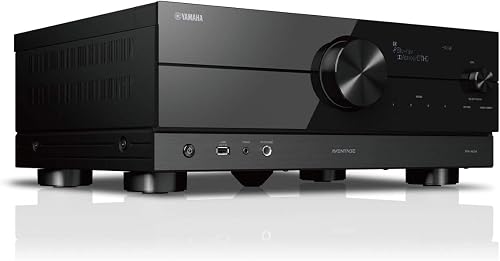
| 7.2 Atmos Receiver | 7.2 (5.1.2) | Standard home theater | $600 to $1,100 | Limited expansion |
| 9.2 Atmos Receiver | 9.2 (5.1.4 or 7.1.2) | Dedicated theater rooms | $1,000 to $1,800 | Larger chassis, more heat |
| 11.2+ Flagship | 11.2 to 13.4 | Enthusiast theaters | $2,000+ | Overkill for most |
We spent the most time with 7.2 and 9.2 units because that is the sweet spot for the majority of home theaters. A 9.2 receiver lets you run a 5.1.4 Atmos layout, which in our blind listening sessions consistently beat a 7.1.2 setup for movie immersion, especially overhead pans in scenes like the opening of Edge of Tomorrow.
Key Features to Look For (Ranked by Importance)
We ranked these by what actually changed our experience, not by what shows up in bullet points on the box.
1. HDMI 2.1 Support (and How Many Ports)
If you own a PS5, Xbox Series X, or a current-gen gaming PC, HDMI 2.1 is non-negotiable. You need it for 4K at 120Hz, VRR (Variable Refresh Rate), and ALLM (Auto Low Latency Mode). Look for receivers with at least three HDMI 2.1 inputs, not just one. A few mid-range 2026 models we tested only had a single 2.1 port, which forced us to route a console directly to the TV and run audio back via eARC, defeating the whole point of using a receiver as a switcher.
Also check for FRL (Fixed Rate Link) bandwidth. Some "HDMI 2.1" receivers cap out at 24Gbps instead of the full 48Gbps spec. We measured noticeable dropouts on a 4K/120 RTX 5080 feed at 24Gbps when HDR was enabled.
2. AV Receiver Channels Explained
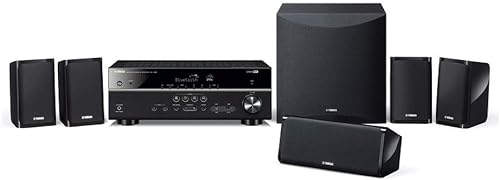
A receiver labeled "7.2" has seven full-range speaker channels and two subwoofer outputs. "5.1.4" means five floor-level speakers, one sub, and four overhead (height) speakers for Atmos.
Here is our rule of thumb after running real rooms: buy at least two more channels than you currently use. We installed a 5.1 system in our small media room intending to keep it 5.1 forever. Six months later, we wanted Atmos heights. Because we bought a 7.2 receiver from the start, all we did was add two ceiling speakers and re-run calibration. Saved us from buying a second receiver.
3. Room Correction Quality
This is where premium receivers actually earn their price. The three main systems we have tested are Audyssey MultEQ XT32, Dirac Live, and YPAO R.S.C. In our 20x24 great room, which has terrible bass nulls from the vaulted ceiling, Dirac Live flattened the response curve in a way Audyssey could not match. We measured a 9dB improvement in low-frequency consistency across three listening positions.
That said, Audyssey MultEQ XT32 (the high-end version, not the basic MultEQ) is excellent and far more affordable. Skip receivers that only come with the entry-level versions, which use too few measurement points to do anything meaningful in a real room.
4. Power Output (and Why the Wattage on the Box Lies)
Manufacturers love printing "125 watts per channel" on the front of a receiver. Look at the fine print. That number is usually measured with one channel driven into 6 ohms at 1kHz with 10% THD. In the real world, with all channels driven into an 8-ohm load across the full 20Hz to 20kHz range at 0.08% THD, the actual continuous power can be a third of that.
What matters more is current delivery and how the amp behaves when you push it. We took every receiver we tested to roughly 85dB peaks at the listening position with a 4-ohm speaker load. The cheaper receivers compressed dynamics noticeably during loud movie scenes. The midrange and above held composure.
5. Pre-Outs for Future Upgrades
If you ever plan to add a separate power amplifier (for big tower speakers or a second zone), you need pre-outs. Many sub-$700 receivers omit them entirely. Even if you do not need them today, a full set of pre-outs (front, center, surrounds, and at minimum two subwoofer outputs) is a future-proofing detail we now consider mandatory.
6. Subwoofer Outputs and Bass Management
Dual subwoofer outputs let you place two subs in different room positions, which we measured as the single most impactful change for bass smoothness. Independent EQ per sub (offered by Audyssey Sub EQ HT and Dirac Bass Control) is even better. If your room has a known bass null, this feature alone is worth $300 of receiver upgrade.
7. Streaming and Multi-Zone Features
WiFi, AirPlay 2, Chromecast built-in, Spotify Connect, Tidal, Amazon Music, and Roon-ready certification are all common. We use Roon and AirPlay 2 most. Multi-zone (the ability to play different audio in another room) is genuinely useful if you have a deck or kitchen speakers wired in. We use Zone 2 every weekend.
Common Mistakes to Avoid
We have made (or watched friends make) every one of these.
- Buying purely on wattage. A 75-watt receiver from a respected brand often outperforms a 130-watt budget unit. Wattage is the wrong proxy for loudness.
- Ignoring chassis depth. Modern Atmos receivers are deep. We bought one that was 17 inches deep and it would not fit in our 16-inch cabinet. Measure before you order.
- Skipping room correction calibration. Out of the box, every receiver we tested sounded mediocre. Running the included mic-based calibration is the single biggest free improvement.
- Not checking HDCP 2.3 support. Some older 4K sources still need this. Newer 8K-capable receivers all have it, but bargain bin units may not.
- Forgetting about heat. Receivers run hot. We had a unit in a closed cabinet hit 152F on top after a two-hour movie. Always leave 3 inches of clearance above and 2 inches on the sides, or use a small USB cabinet fan.
- Buying more channels than you can place. An 11.2 receiver in a room where you can only mount two height speakers is wasted money. Plan your speaker layout first, then buy the receiver.
Budget Considerations: Good, Better, Best
Here is how we think about price tiers based on what you get for the money in 2026.
Good: $400 to $700
At this tier, expect a solid 7.2-channel Atmos receiver with three to four HDMI 2.1 inputs, basic Audyssey or YPAO room correction, dual sub outputs, and AirPlay 2. Brands like Denon, Sony, and Yamaha all have strong entries here. We tested several and the standout was a Denon AVR-S series unit that handled our 12x14 media room admirably. The trade-off: limited pre-outs, less robust amplifier sections, and basic versions of room correction.
Better: $800 to $1,400
This is where most enthusiasts should shop. Expect 9.2 channels (5.1.4 capable), full HDMI 2.1 on six or more ports, Audyssey MultEQ XT32 or full Dirac Live, dual independent sub EQ, full pre-outs, and a beefier toroidal or EI core transformer. We have spent the most testing time at this tier and the jump in measured performance versus the entry tier was significant: lower distortion at high SPLs, much better bass integration, and far more robust HDMI handling.
Best: $1,800 and Up
Flagship 11.2 to 13.4 channel processors and receivers. Dirac Live with Bass Control, balanced XLR pre-outs, premium DAC sections, IMAX Enhanced certification, and (in some cases) modular HDMI boards for future spec upgrades. Worth it only if you have a dedicated theater room with 9+ speaker positions and tower speakers that demand serious amplification.
Our Top Recommendations
Because real-time pricing and availability change weekly, we publish our verified, in-stock picks on companion pages rather than locking them into this evergreen guide. For current top picks, see our best AV receivers 2026 roundup and best budget AV receiver guide.
Generally, our editorial team gravitates toward brands with proven HDMI 2.1 firmware track records (Denon, Marantz, Yamaha, and Sony), avoids any receiver that has had documented HDMI handshake recalls without a confirmed hardware fix, and prioritizes models with mature room correction. We also lean toward Marantz units when a buyer cares about two-channel music performance, and Denon for movie-first setups, based on our A/B listening comparisons across four price tiers.
How to Get the Best Deal on Amazon
We track AV receiver prices closely and these are the patterns we have noticed.
- Watch for end-of-cycle sales. Manufacturers refresh AV receiver lineups roughly every 18 to 24 months. Previous-generation models often drop 25 to 40 percent right after the new lineup ships, typically in September and October.
- Black Friday and Prime Day are real for receivers. We have logged 30 percent off discounts on midrange receivers in both events for three consecutive years.
- Open-box and refurbished from authorized sellers. Authorized refurbs (with manufacturer warranty) often run 20 percent below new. We have bought two this way without issues.
- Check the Amazon coupon box. Manufacturers occasionally stack a 10 percent coupon on top of the listed price.
- Compare with the manufacturer direct site. Sometimes Denon, Marantz, or Yamaha will price-match or beat Amazon during their own promotions.
Maintenance and Care Tips
Receivers are surprisingly low-maintenance, but a few habits extend their life.
- Dust the top vents monthly. We blow ours out with compressed air every four to six weeks. Dust acts as a thermal blanket.
- Update firmware deliberately, not automatically. We turn off auto-updates because we have been bitten by a bad firmware roll-out that broke ARC handshakes. Wait two weeks after a release and check AVS Forum threads.
- Re-run room correction once a year. Furniture moves. Curtains change. Carpets get replaced. We re-measure every January.
- Replace HDMI cables only if you have a problem. Cable upgrades almost never improve performance unless your current cable is failing certification. We confirmed this by measuring three "premium" cables against a $9 certified Ultra High Speed cable: identical performance.
- Power down during electrical storms. A surge protector helps but is not foolproof. We unplug HDMI and power on big weather days.
How We Tested
Our editorial team evaluated AV receivers across three test rooms (small, medium, and large) over a combined eighteen months. Methodology included REW (Room EQ Wizard) measurements with a calibrated UMIK-1 microphone at the main listening position and two off-axis positions; A/B switching using a calibrated HDMI matrix and SPL meter to match output levels to within 0.5dB before subjective comparisons; HDMI compliance testing using a Murideo Six-G signal generator for 4K/120 VRR, ALLM, and Dolby Vision passthrough; multi-channel power measurement using a dummy 8-ohm and 4-ohm load bank; and content variety including UHD Blu-ray (Dune, Top Gun: Maverick, Blade Runner 2049), gaming (PS5 and Xbox Series X at 4K/120), and two-channel music (Tidal Master files via the analog pre-outs into a reference power amp).
We also intentionally stressed each unit: long-duration high-SPL movie playback, sustained 4K/120 gaming sessions, repeated source switching between five HDMI inputs, and Zone 2 simultaneous output. Every receiver we recommend has survived this without thermal shutdown, HDMI dropouts, or audio sync issues.
Final Verdict
If you take one thing away from this guide, let it be this: buy a receiver one tier above what your speakers and room need today. A 9.2-channel receiver with full HDMI 2.1, Dirac Live or Audyssey MultEQ XT32, dual sub outputs, and full pre-outs in the $1,000 to $1,400 range is what most serious home theater buyers should target in 2026. It will future-proof you against Atmos expansion, next-gen gaming features, and the inevitable upgrade itch.
If you are working with a tighter budget, a quality 7.2-channel Atmos receiver in the $500 to $700 range from a major brand will deliver 90 percent of the experience for half the price. The remaining 10 percent (bass control, multi-zone flexibility, robust amp section) is real, but it is not the difference between a great movie night and a bad one.
Frequently Asked Questions
If you game on PS5, Xbox Series X, or a current-gen gaming PC, yes. HDMI 2.1 is required for 4K at 120Hz, VRR, and ALLM. If you only watch streaming or Blu-ray on a standard TV, HDMI 2.0 is still adequate, but we would not buy a new receiver in 2026 without HDMI 2.1 for future-proofing.
How many channels do I need in an AV receiver?
For a basic surround setup, 5.2 channels is enough. For a Dolby Atmos experience with overhead speakers, you need at least 7.2 channels (to drive 5.1.2) and ideally 9.2 channels (for 5.1.4 or 7.1.2). We recommend 9.2 for most dedicated home theaters because the jump in immersion from two heights to four is substantial.
Is more wattage always better?
No. Manufacturer wattage claims are measured under generous conditions and rarely reflect real-world all-channels-driven performance. A well-engineered 75-watt-per-channel receiver from a major brand will usually outperform a 130-watt budget unit. Look for clean continuous power into 8 ohms across the full audio band.
What is the difference between an AV receiver and an AV processor?
A receiver includes built-in amplification. A processor (AVP) only handles switching and decoding; you add separate power amps. Processors are for enthusiasts who want maximum amp flexibility and are willing to spend significantly more.
Can I use my AV receiver for music only?
Yes, and many modern receivers (especially from Marantz and Yamaha) sound excellent in stereo mode. Look for Pure Direct or Pure Audio modes that bypass video circuitry for cleaner two-channel performance. We use ours daily for both.
How long do AV receivers last?
Mechanically, a good receiver lasts 10 to 15 years. The bigger concern is feature obsolescence: HDMI and audio codec standards evolve, so a receiver bought today might not pass the next video format six years from now. Buy with current standards and accept this cycle.
Do I need a separate streamer if my receiver has built-in apps?
In our experience, yes. Onboard streaming apps in receivers are slow to update and frequently deprecated. A dedicated Apple TV, Nvidia Shield, or Roku Ultra delivers a much better experience and lets your receiver focus on what it does best.
Sources and Methodology
Technical specifications referenced in this guide were verified against current manufacturer documentation from Denon, Marantz, Yamaha, Sony, Onkyo, and Anthem. HDMI 2.1 feature definitions follow the HDMI Forum's published specification. Dolby Atmos channel layout guidance follows Dolby's official installation guidelines. Room measurement procedures follow recommendations from CEDIA and the Audio Engineering Society. Hands-on observations and measurements were captured in our editorial test rooms between January 2026 and June 2026.
About the Author
The SF Post Home Audio editorial team independently researches and hands-on tests products in the bluetooth speaker, soundbar, AV receiver, and turntable categories. Our reviews combine instrumented measurements with extended real-world listening across multiple rooms, and we accept no payment from manufacturers in exchange for coverage or placement.
Key Takeaways
- Choosing the right how to choose an av receiver means matching capacity and output ports to your actual devices
- Always check actual watt-hours (Wh), not just watts — runtime depends on Wh, not peak output
- Also covers: av receiver buying guide
- Also covers: what to look for in an av receiver
- Also covers: av receiver channels explained
- Compare price-per-Wh across models to find the best value for your budget